
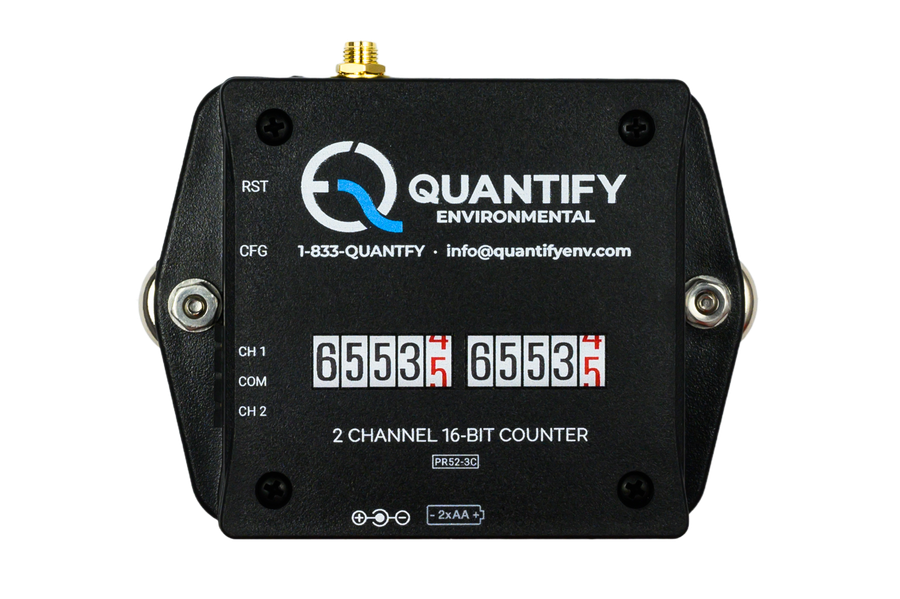
A meter can be doing its job accurately while its readings stay on a dial beside the pipe. We use a pulse counter to bring those readings into the dashboard when the meter has a compatible pulse output.
The meter continues measuring. The counter records its pulses and sends the totals through our monitoring system, giving the team a history they can view remotely.
What the counter reads
A pulse output sends a signal each time a set quantity passes through the meter. The counter records those signals. We configure the system with the meter’s pulse weight so the count can be converted into the appropriate units, such as litres or cubic metres.
That pulse weight matters when choosing the device. It affects how much detail the team can see, particularly at low flow. We check the output and the intended use before deciding whether pulse counting will provide the readings the project needs.
Connecting the reading
The counter connects to the meter’s output. We use 900 MHz long-range wireless (LoRaWAN, Digi XBee and similar) to carry sensor readings to an industrial edge computer, which sends them to the dashboard.
Once the readings are available, the team can compare consumption over time and investigate use outside the expected schedule. An alert can bring an unusual pattern to someone’s attention while the history helps them work out when it began.
Checking the fit
We start by checking whether the existing meter provides a suitable output. We also look at where the equipment sits and what the team wants to learn from it. A running total and a detailed view of changing flow can call for different measurement choices.
That check is part of our work as integrators. We connect useful existing instruments and select additional sensors where they are needed, so the readings can be reviewed together.
Book a site visit to see which of your meters we can connect.